Anúncios
Roblox connects millions of players on PC, Mac, iOS, Android, and Xbox. It’s unique because it offers many player-made games, lets you customize your avatar deeply, and provides Roblox Studio for creators. If you’re new to Roblox or eager to create your first world, here’s what you should know.
Players love Roblox for its variety, like obstacle courses and roleplay games, and its social aspects, such as making friends and joining groups. You can even earn Robux with your creations. This article guides new and mid-level players on how to set up their accounts, explore games, use Roblox Studio, make money, stay safe, build a community, and learn Lua scripting.
Anúncios
This guide gives effective tips and clear steps for playing Roblox safely and creatively. It aims to offer friendly, useful advice for starting your gaming journey, finding amazing games, and creating your own experiences.
Key Takeaways
- Roblox is a user-generated platform across many devices, including Roblox Studio for creators.
- Its variety and social features make Roblox gaming popular.
- The guide includes help on setup, game discovery, creation, making money, and safety.
- Skills to learn include Lua programming and game design basics.
- Useful Roblox tips for playing safely and enhancing your creativity are covered.
Getting Started with Roblox: Account Setup and Safety Tips
To start on Roblox, just follow a few steps. Go to roblox.com or get the app. You need to enter your birthdate, choose a username, make a strong password, and add a recovery email. Finish signing up by verifying your email. Then, turn on two-step verification for extra safety.
Creating your Roblox account step-by-step
First, open Roblox on the web or app and click “Sign Up.” You’ll have to enter your birthdate, which helps set the right chat filters. Choose a unique username. Pick a password that’s secure and not used elsewhere. Confirm your email to enable account recovery and get receipt emails.
Choosing a safe username and protecting your profile
Pick a username that’s easy to remember but doesn’t give away personal info. Don’t use your full name, birth year, address, or school. Activate an account PIN to prevent unwanted purchases and keep your password to yourself. Adjust your privacy settings to limit who can contact you or join your games.
Parental controls and privacy settings for younger players
Parents should use Roblox’s parental controls, like Account Restrictions for safer play. Adjust chat filters and privacy settings to control interactions. Connect a parent email to monitor purchases and set spending limits on both iOS and Android.
Tell your children not to share personal info in chat. Teach them how to report bad behavior in-game or on the Safety & Moderation page. Checking in often makes Roblox safer and more enjoyable for families.
How to Explore Roblox Games: Finding Fun for Every Interest
Starting your quest for the perfect Roblox game begins by knowing where to look. Dive into the Discover and Featured sections to spot games that are buzzing and season specials picked by Roblox experts. These areas showcase big hits and impressive newcomers for a quick glimpse of what’s popular.
To narrow down your search, use specific keywords and genres in the Roblox search bar. Input words like Adventure, Roleplay, Obby, Simulator, or Tycoon. Then, organize your findings by Popularity, Top Rated, or Recently Updated. Reviews and current player counts give you a good idea of a game’s vibe and worthiness.
Start with the Discover and Featured tabs, then use filters for more precision. Filter by device compatibility, update time, and if games are for single players or groups. Testing out games at different player counts helps figure out if you prefer playing solo or with buddies.
Keep tabs on creators you like to stay informed about their latest projects. Add favorite games to your list for easy access. And join creators’ groups for exclusive updates and benefits. Always check game details for update info, compatible devices, and developer advice to know what’s coming.
For quick Roblox game finds, mix tags, filters, and follow trends. Use the Roblox search wisely, keep an eye on Featured games, and personalize your list. This way, you create a unique feed of Roblox gems that match your preferences.
roblox: Popular Game Types and Trending Experiences
Roblox has many styles of play that keep gamers coming back for more. This guide will tell you about the main types of Roblox games. Learn why some games become really popular. You will discover obby challenges, simulator loops, roleplay areas, and tycoon games that need strategy to win.
Obby, simulator, roleplay, and tycoon game types explained
Obby games in Roblox are all about jumping and making it through obstacles. You race, aim to be precise, and try to beat your last time. These games are best when they’re tough but fair.
Simulator games in Roblox let you gather resources and get better gear. You feel like you’re moving forward because of the game’s design. Game makers make money by offering special items, pets, or chances to start fresh but with benefits.
In Roblox roleplay games, you create stories with other players. Top games offer you places to live, work, and hang out with friends. They make it easy to play together for hours.
Tycoon games are all about making smart plans and running things. You set up ways to make money, buy better stuff, and grow your empire. They’re great for people who like thinking ahead and seeing their plans work out.
What makes a Roblox game trend?
A game gets popular when it’s easy to play in short times and fun to share with friends. Eye-catching images, constant new content, and events make a game more visible. Teaming up with YouTubers or Twitch streamers also attracts new players.
Games with fun ways to compete or show off wins keep players coming back. Adding new things to do keeps the game feeling fresh. This is how a game stays on the list of trending Roblox games.
Examples of enduring popular titles to try
Adopt Me! is still a favorite because of its group activities and events. Brookhaven RP attracts gamers with its deep roleplay and options to decorate homes. Tower of Hell is a hit for those who love a good challenge in obby games.
Blox Fruits and Jailbreak mix going up levels with action-packed adventures. Pet Simulator is engaging with its collection aspect and constant improvements.
Look for games with frequent updates, a big number of players, and streamers showing it off. These factors indicate a game is well-supported and fun, standing out among trending Roblox games.
Creating Your First Roblox Experience: Roblox Studio Basics
Begin with small projects and always be eager to learn more. This section guides you through installing Roblox Studio, picking a template, and navigating basic Roblox building tools. It even introduces you to Lua scripting in Roblox. Each step is designed to ease you into the process, helping you create something fun quickly.
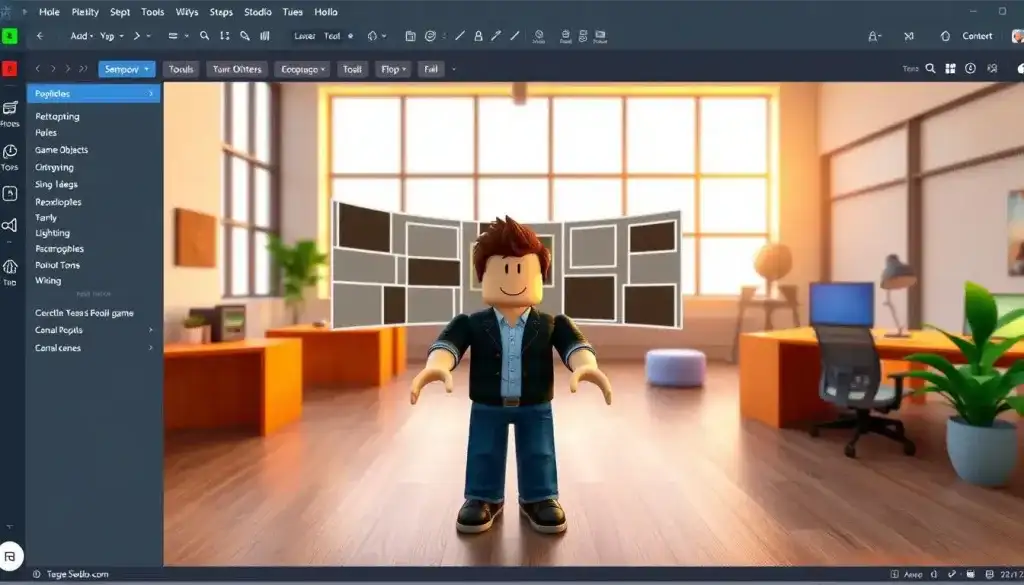
To get Roblox Studio, head to the Create page on roblox.com and download the setup. After signing in with your Roblox account, select a starting template like Baseplate, Obby, or Racing. Turn on the View menu options for Explorer, Properties, and Toolbox. This helps you understand how different parts and models work together.
Understanding the interface is key to building efficiently. The Explorer shows the structure of your scene. The Properties section reveals the settings for any item you choose. The Toolbox provides fast access to models and assets. Just remember to pick wisely to avoid items that might not work well.
Begin building with Move, Scale, and Rotate tools. Snap parts to grid lines and adjust the grid size for neat arrangements. Secure movable parts with Anchor and use CanCollide for interactive objects. Learning the differences between parts, models, and unions helps you organize your scene better.
Choosing colors and materials carefully sets the tone of your game. Stick to a limited color scheme and use materials consistently for a unified look. Be careful when adding items from the Toolbox, avoid those with too many parts or scripts that could bog down your game.
Keep scripting simple at first. Roblox Studio runs on Lua script. Start by tweaking a Script to make a part move, react to being touched, or add a ClickDetector. Use RemoteEvents for communicating between client and server in multiplayer setups.
Regularly test your game with Play Solo and Start Server to catch issues. These modes help you identify script and networking problems. For more help, the Roblox Developer Hub and YouTube tutorials are great for beginners wanting to learn Lua scripting for Roblox.
Refer to the table below for a summary of starter options and their uses.
| Starter Template | Best For | Key Tools to Learn First | Quick Tip |
|---|---|---|---|
| Baseplate | Learning layout and basic parts | Move, Scale, Anchor | Keep grid snapping on for neat builds |
| Obby | Platforming obstacles and physics | CanCollide, Collision groups, Touched events | Test jumps frequently to tune difficulty |
| Racing | Tracks, vehicles, and spawn systems | Models, Anchoring, RemoteEvents | Use simple checkpoints to track progress |
| Starter Place with Models | Rapid prototyping of a scene | Toolbox vetting, Optimization, Material use | Inspect imported models for excess parts |
Monetization and Robux: Earning and Spending in Roblox
Roblox’s virtual currency, Robux, lets players buy avatar items and get into paid games. You can get Robux on the Roblox website or through apps and gift cards. Joining Roblox Premium gives creators a monthly amount of Robux plus extras to help them make more money over time.
What is Robux and how to get it
With Robux, you can buy cool stuff, enter paid games, and enjoy special benefits. Get Robux by buying them, getting them with Roblox Premium, or making them through your own games. Always keep your purchase records and check your account to manage your spending.
Selling game passes, developer products, and avatar items
Game creators can sell passes that give players special abilities and items that can be used up like boosts. If you want to sell avatar items, make sure they meet Roblox’s guidelines. Price your items wisely, thinking about Roblox’s fees, so you make money and players are happy.
Budgeting Robux and recognizing scams
It’s smart to decide on a Robux budget each month and use a PIN for purchases on young accounts. Stay away from trading Robux outside Roblox or sites promising free Robux. To fight scams, use Roblox’s report feature and official help. Always use safe ways to buy Robux and keep your login info private.
Customizing Avatars: Personal Style and Trends
Starting a unique look begins with the Avatar Editor. It’s available on the website or mobile app. You can mix body types, layered clothes, accessories, and animation packs for a perfect look. The way your character moves and uses emotes can really change their feel.
Choosing outfits goes beyond just picking a shirt or pants. It’s about creating a consistent theme with Roblox outfits that share colors and moods. Mix rare pieces with affordable ones to get both uniqueness and style without spending too much.
You can find free Roblox items in the Catalog, at events, or from promotions like Xbox or PC Game Pass rewards. The Creator Marketplace is filled with free content from community creators. For premium items, which cost Robux and might be rare or collectible, always check the ratings and the seller’s credibility before buying.
Accessories and animation packs make a strong first impression. Test out different animation packs to find the perfect fit for your Roblox avatar. Even small items like a hat, backpack, or emote can upgrade a simple look into something special.
To create a special avatar identity, follow these easy tips:
- Pick a clear theme: casual, futuristic, fantasy, or retro.
- Stick to a consistent color scheme to connect everything.
- Use one eye-catching item with simpler supporting items.
- Change your look with the seasons to keep it fresh.
For creators selling avatar items, focus on high-quality thumbnails and detailed descriptions showing how the pieces go together. Set fair prices and follow the Marketplace rules to gain trust and get noticed.
Keep trying new things. The best avatar customizations mix free Roblox items with a few premium pieces and vary animation packs until everything just clicks.
Advanced Building Techniques and Game Design Tips
Good design mixes creativity with rules. Set clear goals and use guided paths and challenges to hold players’ interest. Teaching players game mechanics smoothly is a key in Roblox design.
Level design principles for engaging gameplay
Begin each section with an easy goal. Slowly bring in new game mechanics to reward players for learning. Checkpoints help reduce upset and keep things moving.
Guide players with light and sound. Make sure they can find their way without too much help. Balancing dangers and rewards makes exploring exciting.
Optimizing performance and reducing lag
To cut down lag, use fewer parts by merging them and choosing meshes. Use simpler details for objects that are far away. Write efficient code to speed up the game.
Let the game load things only when needed and check your game on different platforms. Doing regular checks helps make your Roblox game run better and reduces lag on all devices.
Testing, iteration, and player feedback loops
Hold test plays privately and check stats with Roblox’s tools. Get feedback directly from players through Discord, posts, or surveys. Watch how long they play and how much they spend to know what to improve.
Update your game often and share the changes to gain players’ trust. Test out new ideas and see their effect. Using data to make decisions helps improve your Roblox game over time.
Community and Social Features: Playing with Friends and Groups
Roblox shines when you play and create with others. Building a group, adding friends, and hosting events make it more fun. Community tools help organize teams, share news, and thank loyal members.

Being part of a group makes a place for your projects and sales. You can decide roles and who can do what, letting moderators keep things in order. Groups are great for teamwork and selling special items to help everyone.
Chat, party invites, and private servers let you play safely. You can set it so only friends or team members can come in. Party invites are perfect for jumping into games quickly. Private servers are best for trying out new things or making videos.
Hosting in-game events can make your game more popular. Launch parties, seasonal games, and contests make things exciting. Use social media and streaming to get more players.
Working with other creators can help you reach more people. Doing things together, like updates or events, brings both groups together. Giving out unique items or badges at events makes players loyal and spreads the word.
It’s important to keep things safe when playing Roblox with others. Having trusted moderators, clear rules, and ways to report problems helps. Checking in often and moderating keeps the community safe and open for everyone.
Roblox Safety and Moderation: Staying Secure While Playing
Roblox is all about fun and safety. It’s essential to know how moderation keeps things safe, how to report abuse, and steps to secure your account. Remember these tips, whether you’re playing, creating, or running a group.
Recognizing and reporting inappropriate behavior
Roblox uses both automated filters and human review to catch bad content. If you’re harassed or see something offensive, report it using the in-game Report Abuse feature. It helps to capture a screenshot and note the time and user name for a stronger report.
Make sure to report any scams, hate speech, or cheating as soon as you see them. Quick reporting helps moderators act swiftly, maintaining a healthy community for everyone.
Account recovery and two-step verification options
Adding a verified email and phone number makes account recovery on Roblox much easier. Having these can help quickly if your account gets hacked or there’s a payment issue.
Enable two-step verification for added security. Roblox lets you use email or authenticator apps for 2SV, keeping your account safe from intruders. Reach out to Roblox Support with proof if you have trouble accessing your account.
Guidelines for safe communication and content sharing
Never share personal info like your name, address, or passwords in chat. It’s important for younger users to avoid clicking on unknown links or accepting bogus offers for free Robux.
Content creators should adhere to Community Standards and Terms of Use. By following clear guidelines and being cautious with what we share, we can keep risks low for everyone involved.
| Topic | Action | Benefit |
|---|---|---|
| Roblox moderation | Use Report Abuse and save evidence | Faster removal of harmful content |
| Report on Roblox | Report scams, harassment, and cheating | Safer play for all users |
| Account recovery Roblox | Verify email/phone and enable 2SV | Quicker recovery and stronger security |
| Safe communication | Avoid sharing personal info and links | Reduced risk of phishing and fraud |
Learning Through Roblox: Educational Benefits and Coding Pathways
Roblox mixes fun with learning. Young creators learn about game design and coding in Roblox Studio. They get to understand complex ideas like physics and logic in a hands-on way.
How Roblox teaches game design and programming fundamentals
Beginners start by creating simple levels and learning game balance. They explore physics and learn to make games run smoothly. Coding in Roblox shows how changing code can affect how players experience the game.
Resources for learning Lua and advanced scripting
The Roblox Developer Hub and Roblox Education provide official guides and projects. YouTube and Udemy offer more learning options. Lua tutorials geared towards Roblox help users advance their skills in coding, from basics to more complex topics.
Programs and camps that use Roblox for education
Many programs and camps offer courses in Roblox coding. They often end with students creating something they can show off. Partnering with Roblox Education, these programs help students learn in a project-based way.
There are clear steps from enjoying Roblox to making it a career. Creating games helps with getting internships or jobs in gaming. Being part of a developer community provides valuable feedback and support.
Tips to Grow Your Roblox Game Audience and Community
Building a loyal player base requires a blend of great presentation, consistent interaction, and precise analysis. Focus on vivid graphics, frequent game updates, and heeding player feedback to enhance your Roblox game’s popularity over time.
Begin with the basics of marketing. Design an appealing thumbnail and a clear, keyword-filled description. Start with a strong hook. Use the right tags and categories to help people find your game easier. Post videos and teasers on YouTube, TikTok, X, and Discord to increase visibility. This will also attract supporters for your game’s promotion on Roblox.
Employ engaging strategies to retain players. Organize time-limited events, seasonal content, and rewards for frequent play. Introduce leaderboards, achievements, and referral bonuses to encourage competition and sharing. Posting updates shows active improvement, retaining players and spreading your game through word of mouth.
Use Roblox analytics to monitor important metrics. Keep an eye on daily active users, how often they return, session times, and purchases. Combine the Developer Console and external tools to understand trends and earnings per player. Add player surveys and tests to focus on features that attract more players and enhance your Roblox game’s performance.
Work with content creators to extend your game’s reach. Team up with streamers and YouTubers who resonate with your target audience. Provide unique access or special items for their events to spark interest. Collaborating with well-known creators accelerates your promotional efforts on Roblox and draws more players to your game.
Update regularly to maintain player interest. Small, frequent updates are better than big, rare ones. Share future plans on social platforms and in your game’s description. Showing consistent game improvements encourages players to spend more time and brings in their friends. This creates a stronger community and keeps players coming back.
| Goal | Action | Key Metric | Expected Impact |
|---|---|---|---|
| Increase visibility | Optimize thumbnail, icon, and first-line pitch | Impressions and click-through rate | Higher discovery and initial play rate |
| Boost retention | Seasonal events, daily rewards, leaderboards | 7-day retention and DAU | Longer sessions and repeat visits |
| Improve monetization | Test developer products and bundled offers | Conversion rate and revenue per user | More predictable earnings and sustainable updates |
| Refine experience | Use Roblox analytics and player surveys | Session heatmaps and qualitative feedback | Prioritized roadmap that aligns with players |
| Grow community | Partner with creators and run community contests | Referral installs and Discord members | Organic promotion and higher player advocacy |
Conclusion
Roblox is a huge, inventive platform where users explore, customize avatars, and make games with Roblox Studio. This conclusion of the roblox guide outlines key steps: get your account ready, make it secure, and learn safety tips before going further.
To dive deeper into Roblox, search through different game genres and follow your favorite creators. Then, try making something simple in Roblox Studio. Start understanding Lua with help from the Developer Hub and tutorials, turning your ideas into games. Join communities, host mini events, and use feedback to make your games better.
Ready to start with Roblox? Set up your account, enhance its security, and then jump into exploring. Lean on official tools like Roblox Help, the Developer Hub, and Roblox Education to guide you. Begin your Roblox journey with confidence, create thoughtfully, share safely, and continue enjoying the fun securely.
FAQ
What is Roblox and how does it work?
Roblox is an online platform created by the Roblox Corporation. It connects millions of players across different devices to games made by other users. You can join games, make your own avatar, and even create your own games using Roblox Studio.
How do I create a safe Roblox account?
To start, sign up on roblox.com or in the app. You’ll need to provide your birthdate, pick a username and a strong password, and verify your email. To keep your account secure, turn on two-step verification and set a PIN for purchases. Choose a username that doesn’t give away personal info and always use unique passwords.
What parental controls and privacy settings are available?
Roblox has chat filters, Account Restrictions for safer content, and privacy controls. Parents can link an email to their child’s account, set a PIN for purchases, check the purchase history, and set spending limits on mobile devices. It’s important to teach your kids not to share personal info. Use the Report Abuse feature if there’s a problem.
How do I find good games on Roblox?
Check out the Discover and Featured sections for trending and recommended games. You can filter games by type, like Obby or Simulator, and look for ones with high player counts or good reviews. Follow your favorite game creators and save games you like to try later.
What are the main types of Roblox games?
Popular game types include Obbys, Simulators, Roleplay games, and Tycoons. They offer various playstyles and ways to make money. Some are great for quick play sessions, while others let you dive deep into the game’s progression.
Why do some Roblox games trend?
Games become popular because they are fun, update often, and have exciting events. They also get noticed through social media and by being featured on YouTube or Twitch. Features like badges, leaderboards, and working with other creators help too.
How do I install and start with Roblox Studio?
First, download Roblox Studio from roblox.com/create. Sign in, pick a template, and start exploring the tools. Learn to use the Move, Scale, and Rotate tools to adjust game components. This will help you start creating on Roblox.
Is Lua hard to learn for Roblox scripting?
Lua is easy for beginners, and there are plenty of guides available. Start with the basics like manipulating objects and using events. Practice a lot, and try out small projects to get better. You can find tutorials on Roblox’s site and YouTube.
What is Robux and how can I get it?
Robux is the virtual currency on Roblox. You can buy it on the site, through apps, or with gift cards. Being a Roblox Premium member gives you more Robux and other benefits.
How can creators earn Robux on Roblox?
Creators make money by selling game passes, developer products, and avatar items. If they’re successful, they can exchange Robux for real money. It’s important to price items well and follow the Marketplace’s rules.
How do I avoid Robux scams and manage spending?
Avoid offers for “free Robux” and stay within official payment methods. Use a purchase PIN to avoid accidental buys. Keep an eye on your billing history and report any suspicious activity. Be careful about sharing personal or account info.
Where can I find free or premium avatar items?
The Catalog has both free and premium items. Look for free items during events or as special promotions. Premium items cost Robux, and some are rare or collectible. Always check ratings and the seller’s reputation.
What are tips for creating a distinctive avatar?
Choose a theme and stick with it. Use a mix of unique, limited, and affordable pieces. Animations can also make your avatar stand out. For creators, make sure your thumbnails and descriptions are clear and attractive.
How do I optimize a Roblox game for performance?
Use fewer parts, simplify graphics, and set up your game to load smoothly. Test it on different devices to make sure it runs well everywhere. Good scripting and managing your game’s assets are key to less lag.
What are best practices for testing and iterating a game?
Try out your game with a small group first, use Roblox’s built-in analytics, and ask players for feedback. Update your game regularly based on what you learn. Watching how players respond can help you make your game even better.
How do groups and social features work on Roblox?
Groups let users band together, assign roles, and even sell items just for their group. Use settings to control who can join and how the group is run. Private servers and chat features make it fun to play with friends.
How can I host events or collaborate with other creators?
Hosting events or working with other creators can make your games more fun and attractive. Share your events on social media and with your followers. Offering special items or achievements can make players more excited to participate.
How do I report inappropriate behavior or content?
If you see something wrong, use the Report Abuse button in-game or on the user’s profile. Adding details like screenshots can help. Roblox uses both automatic systems and real people to check reports, so don’t hesitate to contact support for big problems.
What should I do if my account is compromised?
Change your password right away and enable two-step verification. Contact Roblox Support if you need help or to report unauthorized activity. Keep track of your purchase history for reference.
Can Roblox be used for learning and coding education?
Yes, Roblox Studio is great for learning about game design and coding. There are lots of resources available to help you. Schools and camps use Roblox to teach coding in a fun way.
What resources help me learn Lua and advanced scripting?
The Roblox Developer Hub is a good place to start. YouTube and online courses offer more help with Lua. By practicing with small projects, you can improve your scripting skills.
How do I market my Roblox game and grow an audience?
Make your game’s thumbnail and description stand out. Use social media to spread the word. Working with popular gamers can also get more eyes on your game. Keep your players coming back with updates and rewards.
Which metrics should I track to measure success?
Watch your daily users, how long they stay, and if they’re buying anything. Roblox’s tools can show you these stats. Surveys and player feedback are also valuable. Use this info to make your game better for everyone.
Content created with the help of Artificial Intelligence.